
Configure by USB; verify by observation
In about 20 minutes, load Wi-Fi settings, read a redacted status, restart the example application, then clear or recover its configuration. Saving a file is not the same as joining Wi-Fi.
Recognize your materials
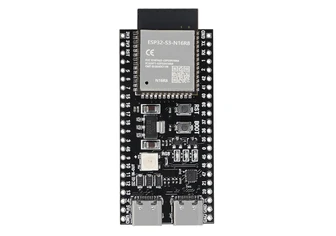
ESP32-S3-N16R8
Runs MicroPython and the lab app. Use native USB: left in the front view, antenna up.
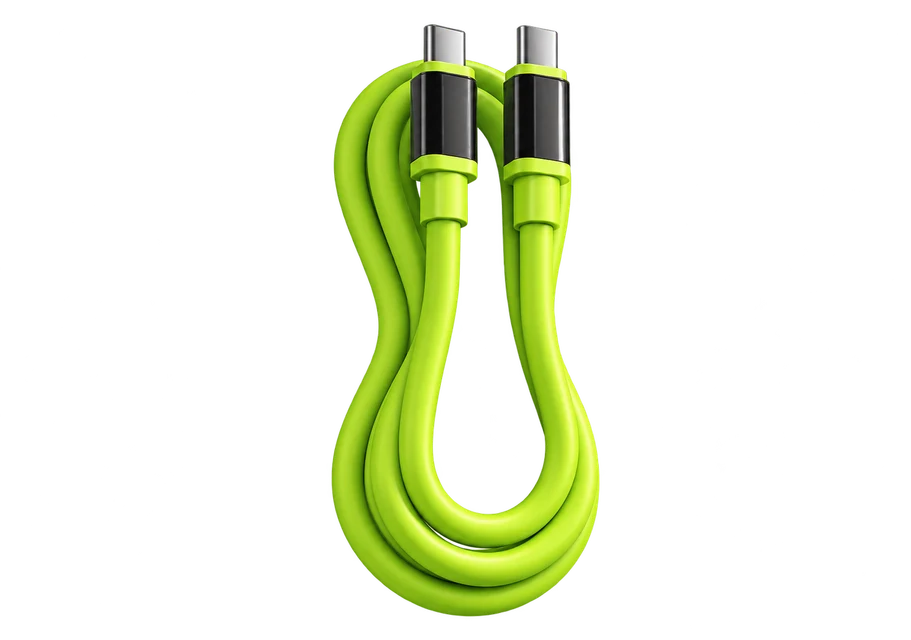
USB data cable
Carries the file transfer. Keep other circuits and external power disconnected.
Computer + terminal
Runs the supplied helper. Use a private terminal for hidden input.
Permitted 2.4 GHz Wi-Fi
Use a WPA2-Personal lab network you may configure. Know its name and password.
Prerequisites: working MicroPython from ML-C03, reliable USB from ML-C04, desktop Python 3.10+ and the example files. No prior network programming is required.
Separate private settings from code
A configuration is data that changes how a program behaves. This lab app reads one JSON file: /lab_wifi.json. JSON stores named fields such as a network name and password.
ssid: network name
password: hidden input
SSID: 1–32 UTF-8 bytes.
WPA2: 8–63 printable ASCII characters.
SSID
The Wi-Fi network name. The limit counts UTF-8 bytes; plain ASCII characters use one byte each. Copy the exact name, including case.
Passphrase
This exercise accepts WPA2-Personal passwords of 8–63 printable ASCII characters. Enterprise, open networks and 64-digit hexadecimal keys are outside this lab.
Check: no. Update the lab configuration and restart the app to apply it.
Prepare the files and computer tool
Save the four example files below in one folder named usb-config-lab. Keep their names unchanged. The helper runs on the computer; the application files are copied to the board.
lab_config.py
main.py↓Run the helper here
main.py↓lab_wifi.json is private data
Create a tool environment
Open a terminal in that folder. Confirm python --version before continuing.
python -m venv .venv
.venv\Scripts\python.exe -m pip install mpremote
PY below means .venv\Scripts\python.exe on Windows or .venv/bin/python on macOS / Linux. Replace PY with that executable path in every command.
Install the small lab application
Use one USB data cable in native USB. In the component-side view, antenna up and sockets down, it is the left socket. Close other serial monitors and browser connections.
PY -m mpremote connect list
PORT below means your current runtime port, such as COM7 on Windows. The example name is not a required port.
Save your existing project before replacing main.py
PY -m mpremote connect PORT fs cp :/main.py original-main.py
If there is no existing main.py, there is nothing to copy. Save other project files you need too. Then install the lab app:
PY usb_config.py --port PORT install --replace-main
PY usb_config.py --port PORT status
{"config_state":"missing","configured":false,"link_up":false}.The app files are installed; the private settings have not been supplied yet.
main.py and lab_config.py. It does not erase firmware or change the configuration file.Load settings without showing them
Run the helper in a private terminal. It asks for both the SSID and password without showing the typed characters. Do not put real credentials into a shell command, screenshot or chat message.
PY usb_config.py --port PORT configure
{"config_state":"saved","configured":true,"link_up":false}Saved only. Restart the lab app to test these settings.The helper checks the schema and field lengths before copying. If hidden input is unavailable, it stops instead of falling back to visibly typed input.
Read status without confusing the two checks
The helper’s status action reads the file and the current station link. It does not apply a new file. An older link may still be active until the app restarts.
PY usb_config.py --port PORT status
configured: true↓Valid fields are stored
config_state
missing: no lab file.invalid: data fails parsing or validation.saved: valid data is present.unreadable: the app could not read it.
link_up
The current STA interface reports a connection with an IP address. It does not say that a newly copied file was used for that connection.
link_up:true prove the new password worked?Check: no. Restart the app and observe a fresh result.
Restart and observe a fresh connection
Open the board console with the normal runtime port. Press Ctrl-C for >>>, then Ctrl-D at that normal prompt to restart Python and run the installed main.py.
PY -m mpremote connect PORT repl
{"event":"wifi_start","state":"connected"}In this app, that result follows a fresh connection attempt with the saved file and a station IP address.
The attempt is limited to about 15 seconds. A timeout or connect_failed result means investigate the network and settings; it does not mean the firmware must be erased.
Ctrl-] exits mpremote before another tool uses the port. A router connection is not proof of Internet or cloud-service access.
Clear the lab configuration, keep the program
Make a private backup if you need the existing settings. The helper refuses to overwrite an existing backup name. The backup contains credentials: keep it private and out of Git.
PY usb_config.py --port PORT backup --to lab_wifi.backup.json
PY usb_config.py --port PORT clear
Disconnect the lab STA link.↓Next startup: missing
Other files and private backups
config_state:"missing", configured:false, link_up:false.After a normal restart, the lab app reports
wifi_start with state missing.missing. You can configure again using the same program; there is no need to reinstall MicroPython.Recover a malformed lab file
A damaged configuration is different from damaged firmware. The app leaves an invalid file in place so you can preserve it privately before replacing it.
Optional practice with a deliberately broken example
First back up any settings you need. Save invalid_lab_wifi.txt beside the Python files. This next command replaces only the lab config with a broken, non-sensitive example:
PY -m mpremote connect PORT fs cp invalid_lab_wifi.txt :/lab_wifi.json
PY usb_config.py --port PORT status
Expect config_state:"invalid" and configured:false. Then preserve, clear and enter valid settings:
PY usb_config.py --port PORT backup --to lab_wifi.bad.backup.json
PY usb_config.py --port PORT clear
PY usb_config.py --port PORT configure
Use the first missing observation
Change one thing and repeat the earliest failed checkpoint. Preserve useful facts; leave SSIDs and passwords out of diagnostic captures.
Saved, but timeout
Confirm the permitted 2.4 GHz WPA2-Personal network is available. Re-enter the exact settings privately and restart. A wrong password can pass the format checks.
Recovery still fails
Check the current port, close competing tools and confirm the lab app files are present. A missing or malformed lab file normally needs a file fix.
Your completion check
- Load settings with no credential literal in the shell history.
- Read a status that contains no SSID or password.
- Observe a fresh
connectedresult after normal startup. - Clear only the lab file and confirm
missingafter restart. - Explain how to preserve and replace an invalid lab file.
configured:true means valid settings are stored. A fresh app startup result of connected means the current saved settings completed the lab’s station connection check.Files for this lesson
Practice files
Keep the folder names shown below when saving files. Use these files with the matching steps in this lesson.
Keep your reference
Keep the lesson beside your practice.
Download the PDF to keep the diagrams, commands, and checkpoints close at hand. Return to the first missing observation when a step does not match.